
About this series
Ever since I first saw VPP - the Vector Packet Processor - I have been deeply impressed with its performance and versatility. For those of us who have used Cisco IOS/XR devices, like the classic ASR (aggregation service router), VPP will look and feel quite familiar as many of the approaches are shared between the two.
Load balancing is one of those topics that sounds deceptively simple until you think about it for a while. In this article I take the VPP load balancer plugin out for a spin, fix a handful of API bugs, and add two small new features that make running it in production a little bit easier.
Introduction
IPng runs services that want to be reachable via as few public IP addresses as possible. Let’s say I want to run a DNS resolver or authoritative nameserver or even the IPng website, but I want these to be highly available and perhaps scale to more traffic than one backend server could provide. What are my options?
My first option is just put a bunch of servers online and give them all an A/AAAA record, and put
them all in DNS, say 7 webservers, and then point ipng.ch to those. It’s clumsy, notably if one
server is down for maintenance or failure, one seventh of the traffic may still want to reach it.
Also, removing a server will have lots of lingering traffic stay on the webserver, as clients are
sometimes slow to pick up the DNS changes, even if my TTL is low.
Let me show you an example:
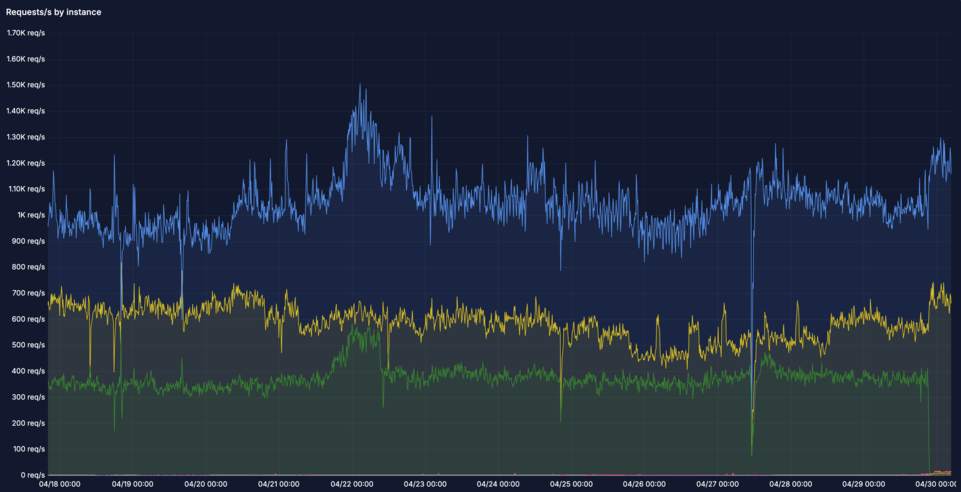
There are two main problems with this graph:
Load imbalance: there are seven webservers in this graph, but somehow only three of them are getting traffic, the others are not. One is much more heavily loaded (
nginx0.chrma0) than the others. It’s receiving 1.2kqps while others are receiving ~40qps. This poses a risk when the clients that are somehow attracted to this instance grow, they may overwhelm this little webserver, even if there are six others that could help out!Drains take forever: The green graph was a drain of
nginx0.nlams2due to a pending maintenance window as the datacenter is closing and the server needs to be physically moved. I put in the DNS change at around 16:15 UTC and the traffic finally dropped at 21:45, a full five hours (!) later. And believe it or not, the TTL was 15 minutes on these records. Some clients just don’t get the hint …
Load balancing 101
A naive load balancing solution is to simply round-robin: send each new packet to the next backend in the list. That works reasonably well for stateless UDP traffic like DNS, although even with DNS there is a gotcha: some DNS queries need TCP, for example those that are too big to fit in a single UDP packet, and they will not be tolerant of naive packet round robin. For TCP this naive load balancing solution quickly falls apart, because every packet in a connection needs to reach the same backend. Sending a SYN to backend A and the subsequent ACK to backend B will not establish a TCP connection.
The classical answer is to keep per-session state on the load balancer: a table that maps a 5-tuple of {source IP, destination IP, source port, destination port, protocol} to a chosen backend. That works, but it introduces a stateful bottleneck. At line rate on a load balancer handling millions of flows and packets/sec, maintaining and synchronising that table across multiple CPU threads is expensive. It also means that if the load balancer restarts, every existing TCP session breaks.
What if there was some form of consistent hashing: given the 5-tuple of a packet, the load balancer might always select the same backend deterministically, without storing any per-session state. If backends come and go, only the flows that were assigned to the changed backend are affected — all other flows keep working. Google solved this problem at scale and published their solution. They call it Maglev.
Introducing Maglev

Google’s Maglev load balancer has been running in production since 2008 and I happen to know several of its authors - as a personal aside I was sad to learn that Cody Smith, with whom I shared an office and a team for many years, passed away earlier this year. Rest in peace, Cody!
The Google team published their design at NSDI 2016 in the paper [Maglev: A Fast and Reliable Software Network Load Balancer]. It is worth reading in full — the paper is well written and covers not only the hashing algorithm but also the wider architecture of how Google handles frontend traffic at scale.
The key insight is that Maglev uses a pre-computed lookup table of size M (some large prime number, 65537 in the paper) filled with backend indices. To handle a packet, the forwarder computes a hash over the 5-tuple modulo M, looks up the table, and forwards to whatever backend is stored there. No per-session state is needed avoiding the need for session matching and lots of RAM, and the flow lookup can be done super efficiently.
The Maglev new flow table
The interesting part is how that lookup table is filled. I learn that a simple approach might be to divide M slots evenly among N backends. That would work, but removing a backend would shift every remaining backend’s range, disrupting all flows and resetting TCP connections all over the place. Maglev uses a smarter fill algorithm:
- For each backend i, derive two independent hash values from its identity (typically its IP address): an offset and a skip value. These define a preference list — a permutation of all M slots that this backend would like to occupy, in preference order.
- Iterate over all backends round-robin. Each backend claims its next preferred slot if it is still free. Continue until every slot is filled.
The result is a table where each backend occupies approximately M/N slots, the distribution is uniform, and most importantly, adding or removing one backend only displaces approximately 1/N of the flows. All other flows keep hashing to the same backend. Slick!
The Maglev existing flow hash table
Consistent hashing handles the common case well, but there is one subtlety: the hashing guarantees that the same 5-tuple always maps to the same backend, but only as long as the set of backends does not change. If a backend is added mid-stream, a fraction of existing TCP connections will start hashing to a different backend.
To protect long-lived connections, Maglev keeps a small per-CPU flow hash table: an LRU cache of recently seen 5-tuple to backend mappings. For every packet:
- Look up in the Maglev flow hash table. On a hit, forward to the cached backend (even if the Maglev table would now say something different).
- On a miss, look up the Maglev new-flow table, select the backend, and insert the mapping into the flow hash table.
The flow hash table does not need to be exhaustive — it only needs to cover active connections. An LRU eviction policy handles the rest. This means the load balancer is mostly stateless, as the Maglev table is deterministic and identical on every CPU, with just enough per-connection state to protect existing TCP sessions from transient backend changes.
VPP LB: Plugin anatomy
The VPP load balancer plugin lives in src/plugins/lb/. Its core data structures map directly to
the Maglev design:
- VIP (Virtual IP): a prefix plus an optional {protocol, port} pair. This is the public-facing address that clients connect to. A VIP can be protocol-agnostic and forward all traffic to its backends, or it can be port-specific and forward only for example TCP/443 to its backends.
- AS (Application Server): a backend endpoint associated with a VIP. The plugin maintains a list of active ASes per VIP.
- New flow table: the Maglev lookup table, computed from the active AS list whenever an AS is added or removed. Size is configurable, defaulting to 1024 entries. It is filled by the clever algorithm described above.
- Flow hash table: per-worker LRU hash table of recent {5-tuple → AS} mappings. This is the connection affinity cache described above.
- Encapsulation: packets are forwarded to the AS by encapsulating them in either GRE (GRE4 or GRE6), or via L3DSR (direct server return using DSCP remarking). The AS decapsulates and responds directly to the client, bypassing the load balancer on the return path.
When a new flow arrives, VPP computes a hash over the 5-tuple modulo the length of its new_flow_table, it then looks up the backend that will serve this client, stores it in the per-worker flow hash table, and encapsulates the packet towards the AS. Subsequent packets for the same 5-tuple hit the flow hash table directly, skipping the Maglev lookup entirely.
A garbage collection timer periodically walks the flow table and removes entries for backends that have become inactive, preventing stale flows from reaching a long-gone AS. Operators can also remove these AS, and flush existing connections to them.
Observations
After reading the LB code in VPP, I am ready to make a few observations.
1: Lameduck I have the choice of ‘remove AS from VIP’, by removing it from the Maglev new-flow table it will not get new flows assigned but if there are long-lived clients, the server will keep connections open potentially indefinitely. A good example is a websocket that streams data between a client and the webserver: it never disconnects!
My other choice is to ‘Remove and flush AS from VIP’, which will also remove it from being eligible for new flows, but forcibly remove all existing flows from the flow hash table at the same time. Yikes.
I want a middle ground, operationally:
- Remove AS from VIP for new connections while keeping existing ones for a grace period. This is commonly referred to as lameduck mode.
- Remove AS from VIP for all connections, which will reset any lingering connections and move them to another backend where they reconnect and continue on their journey.
2: Slow undrain: From my own experience, adding a new AS needs to often be done carefully, for two reasons. First, sloshing traffic around can overwhelm a new / freshly started server which does lazy initialization (for example, a Java binary). Second, a new server may have a different configuration on purpose, for example different version of the server binary, or different parameters like caching flags and what-not. It may be good to ease in traffic and inspect it for a little while before bringing full load onto the server. This is commonly referred to as a canary backend. I’ll come back to this later.
VPP LB: Bugs
While playing around with the plugin’s binary API, I ran into a collection of bugs that made the plugin largely unusable via the API (as opposed to the CLI). I fixed those in Gerrit [45428].
IPv4 VIP prefixlen offset bug:
lb_add_del_vip()was computing the prefix length incorrectly for IPv4 addresses due to an off-by-one in the address family handling, producing VIPs that silently matched no traffic.Wrong encap type on VIP create: Both
lb_add_del_vip()andlb_add_del_vip_v2()were passing the encapsulation type through an incorrect enum mapping, so a VIP created with GRE4 encap via the API would actually end up configured with a different encap type internally.lb_vip_dump() returning wrong fields: The dump handler was returning a stale encap type and an incorrect protocol value, making it impossible to verify what was actually configured via the API.
lb_as_dump() port filter broken: The AS dump call accepts an optional VIP filter. The port comparison was being done against an uninitialized variable, causing the filter to miss entries or match wrong ones depending on stack contents.
Missing lb_conf_get(): There was no API call to retrieve the global LB configuration (flow table size, timeout values). I added
lb_conf_get()so an operator or controlplane can verify the running configuration without resorting to CLI parsing.‘show lb vips’ unformatting error: The CLI handler dereferenced a pointer that is only valid in verbose mode, causing unexpected output (and a possible crash!) on a plain
show lb vips.GC only triggered by CLI input: The garbage collector for the flow table was only invoked when the operator typed a CLI command. On a production load balancer, stale flow entries would accumulate indefinitely. So I added a periodic GC timer that automatically cleans up the flow hash table.
While discussing on the vpp-dev mailing list, my buddy Jerome Tollet independently found two of
these bugs (the encap type mismatch and the dump port filter) and reported them during review. Both
are addressed in the latest patchset.
VPP LB: New Feature - Weights
My attempt to address the two observations above comes from an insight that they are actually the same class of problem: I want to be able to set a variable amount of traffic anywhere from 100% all the way down to 0% of load that a given backend is capable of handling, and I want to be able to flush (remove existing flows from the flow hash table) independently of the new-flow assignment. This is commonly referred to as weights in a load balancer, and in Gerrit [45487] I add per-AS weights to the Maglev new flow table, and decouple ‘flush’ from ‘set weight’ semantically.
The motivation comes from the two operational scenarios I kept running into while testing the plugin:
1. Draining a backend without disrupting existing sessions. When a backend needs to go down for
maintenance, the only option was lb as del flush, which both removes the AS and flushes the
flow table. Flushing the flow table is disruptive: all existing TCP sessions that were pinned to
any backend suddenly need to re-select, causing a brief spike of misdirected packets. What I
actually want is to stop sending new flows to the AS while letting existing sessions drain
naturally.
2. Introducing a new backend gradually. When adding a new AS to a busy VIP, the Maglev algorithm immediately assigns it ~1/N of the new-flow table slots. On a VIP handling tens of thousands of new connections per second, that is a lot of traffic hitting a backend that may not yet be fully warmed up (think JVM JIT, filled caches, established database connections). It would be useful to introduce the new AS slowly and ramp it up over time.
My solution for both is to allow each AS to carry a weight in the range 0–100, which controls what fraction of the new flow table slots it is allowed to occupy:
- weight 100 (default): the AS gets its full ~1/N share of slots. This is the existing behavior, and remains the default.
- weight 1–99: the AS gets a proportionally smaller share. Useful for gradual introduction as well as gradual removal.
- weight 0: the AS gets no slots in the new flow table — no new flows are sent to it. The flow table entries for existing sessions remain intact, so those connections keep working until they naturally expire.
The Maglev fill algorithm is made weight-aware by scaling each AS’s preference list length
proportionally to its weight. The sort order is deterministic (sorted by (replica, address))
so the resulting table is identical regardless of the order ASes were added, which also has a bonus
side effect of making anycast and ECMP VIPs work correctly.
Because VPP developers do not change API signatures once they are published, I added a few new API calls instead:
lb_as_add_del_v2()— creates or deletes an AS with an explicit weight, and optionally flushes the flow table for that AS on deletion.lb_as_dump_v2()— returns the weight and the number of new-flow-table buckets currently assigned to each AS, which is useful for verifying the distribution.lb_as_set_weight()— changes the weight of an existing AS in place, optionally flushing the flow table, without needing to delete and recreate the AS.
From the CLI, the weight is set with:
vpp# lb as 192.0.2.0/32 10.0.0.1 weight 0
vpp# lb as 192.0.2.0/32 10.0.0.1 weight 1
vpp# lb as 192.0.2.0/32 10.0.0.1 weight 10
vpp# lb as 192.0.2.0/32 10.0.0.1 weight 100
vpp# lb as 192.0.2.0/32 10.0.0.1 weight 0
vpp# lb as 192.0.2.0/32 10.0.0.1 weight 0 flush
In the sequence above, backend AS 10.0.0.1 starts off fully drained, then getting a token amount
of traffic by setting it to weight 1, then 10, and finally 100. When the backend needs to be
removed, I can set weight 0 which will put it in lameduck mode but keep existing flows alive.
A few minutes later, I can set it to weight 0 flush which will remove the remaining existing
flows. The backend then can be safely removed, without having to wait 5+ hours like I did with the
uncontrolled DNS ‘drain’.
VPP LB: New Feature - Punt Unknown
I’m still on the fence on this feature, but since I wrote it .. Gerrit
[45431] adds a punt flag to port-based VIPs.
By default, when a VIP is configured with a specific protocol and port (e.g. TCP/443), any packet
that arrives at that VIP’s address but does not match the configured {protocol, port} pair is
sent by VPP to error-drop. This is the correct behavior for most cases: if I am load balancing
TCP/443, I do not want stray UDP packets forwarded anywhere.
The problem is that this also drops ICMP. If an operator runs traceroute towards the VIP, or
sends an ICMP echo, or a client receives an ICMP unreachable, all of that is silently discarded.
This makes the VIP opaque from the network’s perspective and can complicate debugging.
When creating a port-based VIP, I decide to add a punt flag, so any traffic that does not match
the configured protocol/port pairs on the VIP will newly be punted to the local IP stack
(ip4-local or ip6-local) instead of dropped. To make this work, I ask VPP to insert the VIP’s
address into the FIB at a higher priority than device routes, so the punt path is actually
reachable. This allows the load balancer to handle TCP/443 (or whatever protocol/port combinations
are configured) while the local stack takes care of ICMP, traceroute, and anything else that arrives
at that address and is not a part of the maglev configuration.
The punt flag is only permitted on port-based VIPs — on a protocol-agnostic VIP there is
nothing left to punt, since all traffic is already matched and forwarded to application servers.
Enabling this from the CLI is straightforward, at creation time:
vpp# loopback create interface instance 0
vpp# lcp create loop0 host-if maglev0
vpp# set int state loop0 up
vpp# set int ip address loop0 192.0.2.0/32
vpp# lb vip 192.0.2.0/32 protocol tcp port 443 encap gre4 punt
In this configuration snippet, I first create a simple loopback device with a given IPv4 address,
and plumb it through to Linux using the [Linux CP] plugin. This makes
it reachable, I can ping it and traceroute to it just like any other Linux Interface Pair LIP.
Then, I steal some traffic from it, by creating an LB VIP on this address. Without this feature,
the VIP would become unreachable, as the LB plugin would take all traffic destined to the IPv4
address. But with the punt keyword, any traffic not matching the LB VIP(s) on this address, will
be sent onwards to the IP stack and end up in Linux. For those of us who like pinging their VIPs,
the punt feature flag on VIPs will come in handy.
For the same reason as with the other feature I wrote, I need to add new API calls rather than changing existing ones, so here I go:
lb_add_del_vip_v3()— adds ais_puntflag to the VIP creation call.lb_vip_dump_v2()— returnsis_puntin the VIP details, so an operator or controlplane can verify the configuration.
What’s Next
I am going to use Maglev at IPng Networks to load balance our services like SMTP, IMAP, HTTP, DNS and what-not. But before I can do that, I’m going to want to write some sort of controlplane that can manipulate the VIPs, AS weights, and do things like health checking. I’m inspired by [HAProxy] which I used to use way back when. I find its health checking algorithm particularly clever, so I will give that codebase a good read and with what I learn, create a health checking VPP Maglev controlplane which will give me much better insight into what traffic goes where.
Stay tuned!